您现在的位置是:网站首页> 软件下载软件下载
联想官方Superfish卸载工具下载-联想广告软件Superfish自动卸载软件软件下载
 2021-05-21
236人已围观
2021-05-21
236人已围观
简介 联想官方Superfish卸载工具下载-联想广告软件Superfish自动卸载软件软件下载
联想官方将发布一款自动卸载Superfish应用的程序。Superfish出现于2014年9月和2015年1月之间销售的联想笔记本电脑。联想已经联合微软和McAfee等专业机构对Superfish进行专杀操作,并且对此事深表歉意,并继续采取措施修复软件和证书中存在的问题,尽快让公众的信心得以恢复。
run the Automatic Removal tool executable to ensure complete removal of Superfish and Certificates for all major browsers.
Step 1: On Windows 8.1, Open Search
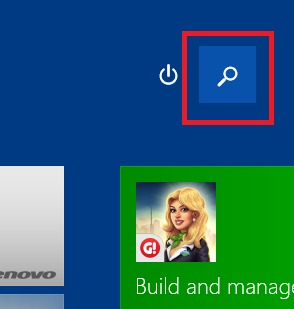
Step 2: Search for “Certificate”. Select “Manage computer certificates”.
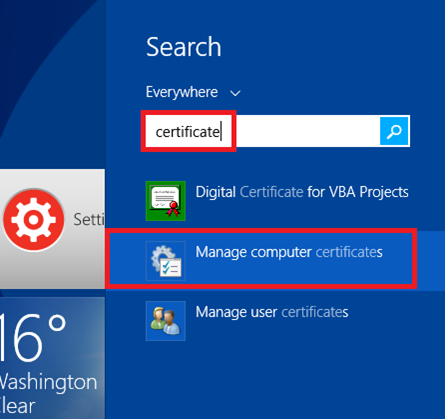
Step 3: When prompted by Windows, “Do you want to allow this program to make changes to this computer?”, select ‘Yes’
Step 4: The certificate manager window should appear. On the left hand panel, select “Trusted Root Certificate Authorities” followed by the sub-folder “Certificates”. On the right panel, find the item with the name “Superfish, Inc.”.
Note: If you do not find an item with the name “SuperFish Inc.”, the certificate is not in the Windows store. You may still need to remove it from Mozilla Firefox and Mozilla Thunderbird if you have them installed. Proceed to B) If you have Firefox browser or Thunderbird Email Client installed you must also perform the following for each individually".

Step 5. Right click on the item labeled “Superfish, Inc.” and select ‘Delete’. On touch systems, you may select the red ‘X’ in top toolbar.
Step 6. When prompted by Windows to confirm the deletion, select ‘Yes’. The certificate should now be removed.
Step 7. Restart your device.
If you have Firefox browser or Thunderbird Email Client installed you must also perform the following for each individually:
Step 1. Open Firefox browser and press either the orange Firefox button

or the Settings button

Step 2. Select Options from the menu
Step 3. Select Advanced from the Options window

Step 4. Next, select the Certificates tab, then press the View Certificates button

Step 5. On the Certificate Manager window, select the Authorities tab, then scroll through the list to find and select the SuperFish, Inc. certificate. Then press the Delete or Distrust … button.

Step 6. In the Delete or Distrust CA Certificates window, select the Superfish, Inc. entry. Then click on OK on all open windows to accept the changes.

Step 7. Restart your device.
Reminder: If you have Thunderbird and Firefox you may have to repeat these steps for each application.
相关内容
- RC930-87静电容键盘驱动-RK RC930-87键盘驱动下载v1.0 官方最新版-软件下载
- Addrbook.Dll文件下载-软件下载
- RK RG928过老电脑主板使用Bug修复软件下载-软件下载
- 启城文件查找管理工具(本地文件搜索)下载v1.0 免费版-软件下载
- 西数硬盘ROM写死恢复工具下载绿色免费版-真正的U指令WDR死ROM恢复工具软件下载
- 浦科特固态硬盘软件Plextool(Plextor SSD)下载v1.1.6 免费版-软件下载
- Process Explorer (x64)下载V16.04 绿色中文版-增强系统任务管理器软件下载
- 绚丽的多彩荧光棒鼠标指针主题下载-软件下载
- Windows宝盒工具合集(32/64位)下载v1.4.2.0 绿色版-软件下载
- Windows VHD/VHDX 辅助处理工具2015下载绿色中文版-软件下载
点击排行
- itunes官方下载中文版 iTunes for Windows v12.12.9.4 32位 官方中文安装版 下载-
- Tubedigger 视频转换软件 v6.5.7 官方免费特别安装版 下载-
- 影视盒下载 星影影视盒 高清视频播放器 V1.8.3 官方最新安装版 下载-
- 呱呱视频社区下载 呱呱视频社区2012版官方 下载-
- 呱呱k歌伴侣下载 呱呱k歌伴侣最新版 2014 v1.7.2 官方安装版 下载-
- 紫狐影视播放器 v2.0 简体中文官方安装版 下载-
- 随播高清影视官方下载 随播高清影视 v5.1 官方最新安装版 下载-
- 乐视视频播放器下载 乐视网络电视 8.0.0下载地址 中文官方正式版 下载-